SMART FORM BUILDER
Intelligent forms. Built in minutes.
Stop wrestling with clunky document editors. Our intelligent Form Builder combines drag-and-drop simplicity, deep bilingual localization, and cutting-edge AI to automate your practice's paperwork.
AI-Powered
Bilingual Support
HIPAA Compliant
20+
Field Types
13+
Preset Prompts
<1min
AI Form Generation
See it in Action
Watch the Magic: Intelligent Form Creation
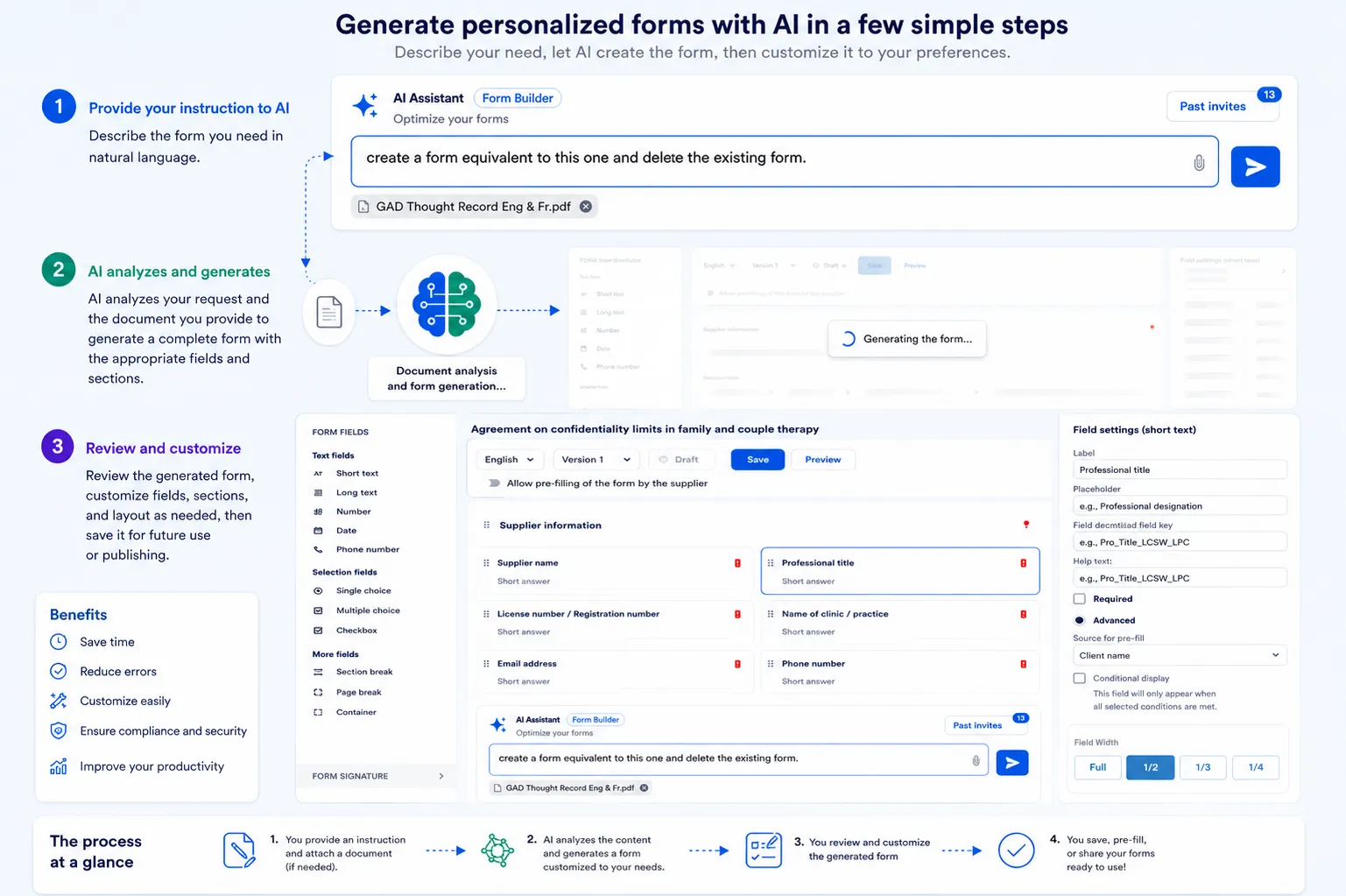
See how our AI assistant instantly transforms your raw intake requirements into a fully functional, professional healthcare form. Skip the manual setup and let our smart builder generate drag-and-drop elements, configure validations, and translate fields—all in a matter of seconds.
Capabilities
Everything you need to build powerful forms.
From simple intake questionnaires to complex multi-step assessments — build, customize, and deploy forms tailored to your clinical practice.
Features
Built for clinical precision.
Every feature is designed with healthcare workflows in mind — from field-level controls to AI-powered automation.
Drag & Drop Builder
Drag input fields, selections, and layout elements onto a visual canvas to build forms without writing a single line of code.
Bilingual Fields
Configure independent English and French labels, placeholders, and descriptions at the field level for full bilingual compliance.
AI Form Generator
Describe the form you need in plain language and let the AI build it instantly — complete with sections, field types, and bilingual labels.
Document Upload
Upload existing PDF or Word documents and the AI will automatically convert them into structured, editable digital forms.
Preset Prompts
Choose from 13+ preset templates like Mental Health Intake, Informed Consent, Telehealth Consent, and more for one-click generation.
Smart Presets
Map fields to system variables like Client Name, Provider License, Session Date, and more to auto-fill data and reduce manual entry.
Live Preview
Preview your form exactly as clients will see it, with bilingual language toggling, before publishing.
Versioning & Drafts
Manage multiple versions of every form. Save drafts, iterate, and publish with full version history and rollback support.
How It Works
From idea to form in four simple steps.
Whether you start from scratch, use a preset, or let AI do the heavy lifting — your form is ready in minutes.
1
Configure
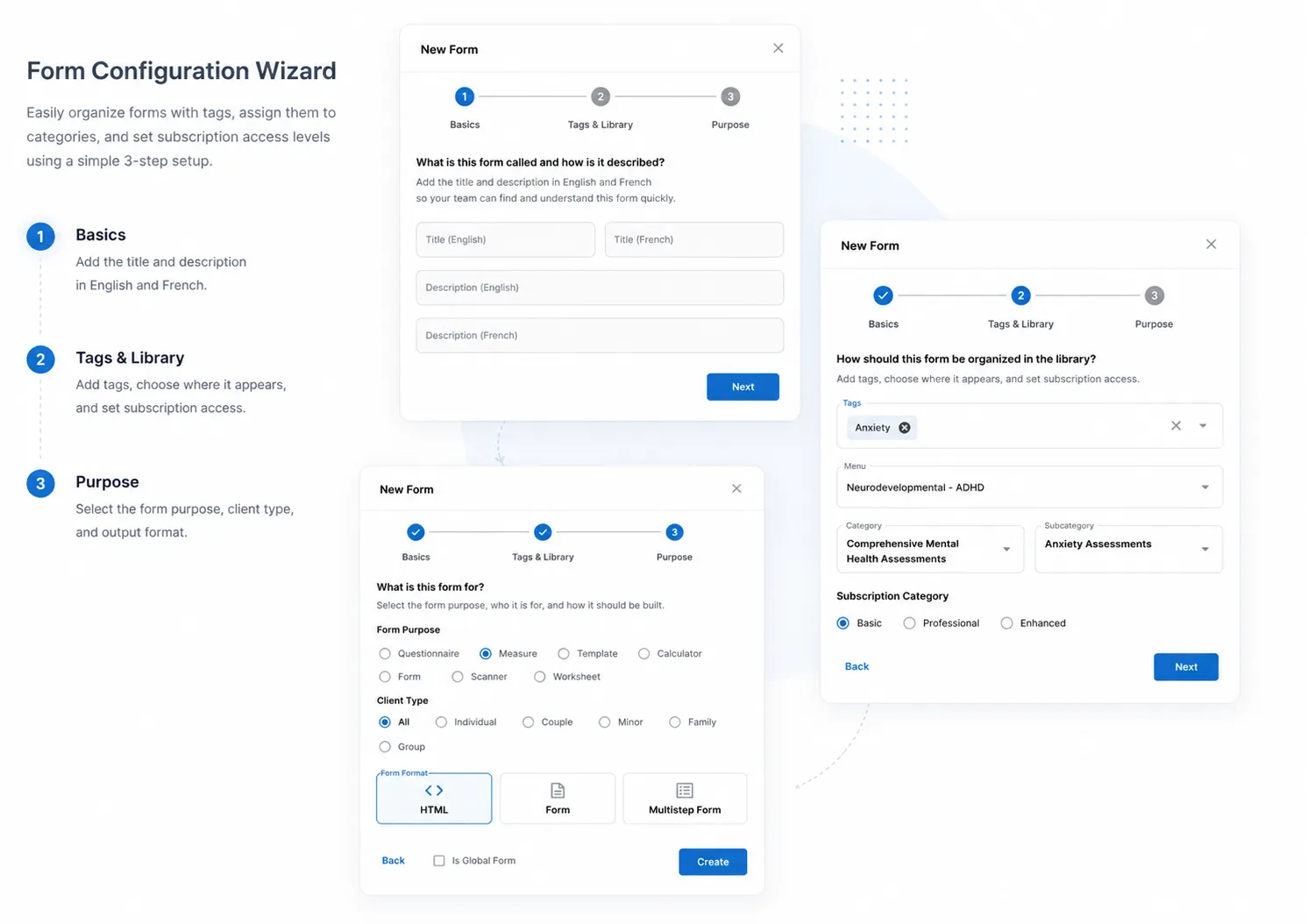
Name your form, add tags, choose a category, select the form purpose and client type using the guided 3-step wizard.
2
Build
Use drag-and-drop or the AI Assistant to populate your form with fields, sections, signatures, and layout elements.
3
Customize
Fine-tune each field with bilingual labels, preset data, validation rules, and responsive width controls.
4
Assign
Preview, save, and attach the form to your intake workflow. Clients can complete it digitally before their first session.
Resource Library
Related Articles & Clinical Guides
NousTalk Clinical Editorial Team••12 mins
A Practical Guide to ACT Therapy Worksheets
How to digitize Acceptance & Commitment Therapy worksheets for interactive client sessions.
Read Full Guide
NousTalk Clinical Editorial Team••8 mins
What is an Intake Form for Counseling?
Creating custom clinical assessment forms and client agreements online.
Read Full Guide
Ready to buildsmarter forms?
Book a demo to see the Smart Form Builder in action and discover how it can streamline your clinical workflows.
AI-Powered Generation
Bilingual Support
HIPAA Compliant