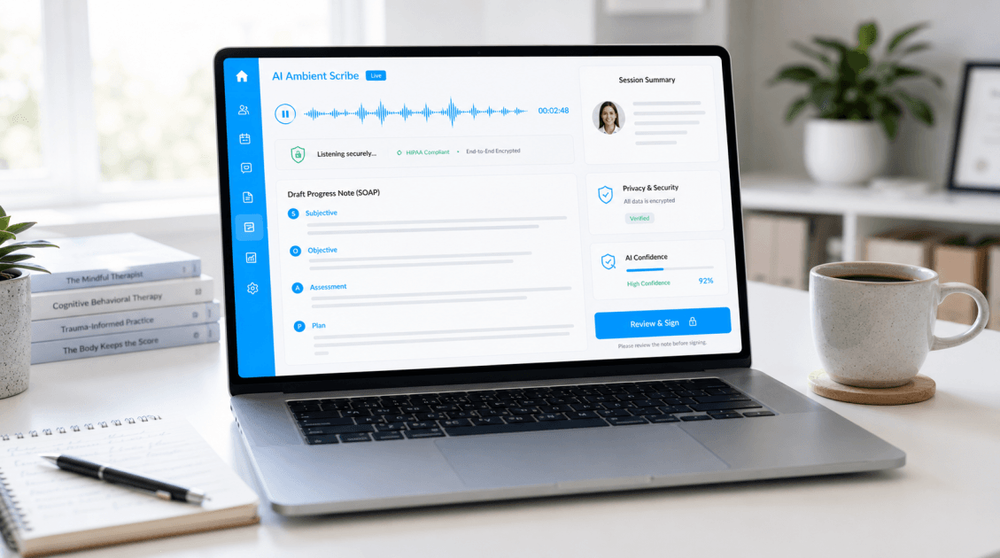
Thinking About an AI Scribe? The Questions Worth Asking First
A plain-language Q&A on AI note-taking for private practice — what it does, where the privacy and accuracy lines are, and how it changes the feel of a session.
Key takeaways
• An AI scribe (sometimes called an “ambient” scribe) listens to a session, transcribes it, and drafts a note you then review, edit, and sign. It assists with the writing; it doesn’t do the clinical thinking.
• The three questions clinicians ask most are about privacy (where does the recording go?), accuracy (can I trust the note?), and workflow (does it actually save time, and does it change the session?). All three have honest, checkable answers.
• The evidence on time saved and burnout is encouraging but early, and it comes mostly from general medicine, not therapy. Accuracy is good but not perfect — these tools can occasionally invent text, so your review is non-negotiable.
• You can try one cautiously: confirm a signed business associate agreement, get client consent, start with a few sessions, and read every draft closely before you trust it.
It’s 6:40 on a Wednesday, you’ve got four notes still open, and someone online keeps telling you an AI tool could have written all of them while you were still in the room. Tempting — and also a little uneasy-making. These are your clients’ most private words. Handing them to software you don’t fully understand isn’t a small step.
So before the sales page wins you over, it’s worth slowing down and asking the questions a careful clinician should ask. None of them are dealbreakers on their own, but each one deserves a real answer. Here’s a plain-language walk through the ones that come up most — grouped by the three things people actually worry about: privacy, accuracy, and what it does to your day.
First: what is an AI scribe, exactly?
An AI scribe is a tool that listens to a session — in person or over telehealth — and produces a draft clinical note. Most work in three steps: they capture audio, turn it into a transcript, and then summarize that transcript into something shaped like a progress note. “Ambient” just means it runs quietly in the background rather than you dictating to it.
The important word is draft. The tool proposes a note. You remain the author: you read it, fix what’s wrong, add what it missed, and sign it. Nothing reaches the chart until you put it there.
The privacy questions
Where does the recording actually go?
This is the first thing to pin down, and vendors vary a lot. Ask: Is the session audio stored, or deleted right after it’s transcribed? Where is the transcript kept, and for how long? Is it encrypted in transit and at rest? Can the company’s staff read it in plain text? A trustworthy vendor will answer all of this clearly, in writing. Strong encryption (the AES-256 standard or similar) and a short, stated retention window are good signs; vague answers are not.
Is it HIPAA or PIPEDA compliant — and do I need a BAA?
An AI scribe is not automatically compliant just because the website says “secure.” In the U.S., because the tool handles protected health information, you generally need the vendor to sign a Business Associate Agreement (BAA) — the contract that legally binds them to the same privacy and security duties you carry. If a vendor won’t sign one, that’s usually a hard stop for clinical use.
In Canada, the framework is different but the discipline is the same. Federally, PIPEDA sets the baseline for handling personal information, and several provinces have their own health-privacy laws — for example, Ontario’s PHIPA (the Personal Health Information Protection Act) governs how custodians handle personal health information. Quebec’s Law 25 adds GDPR-style obligations, including the requirement to assess a transfer before personal information leaves the province. Whichever applies to you, “compliant” is something you verify in the vendor’s agreements and privacy terms, not something you take on faith.
Where will my clients’ data actually live? (A Canadian note on localization)
For Canadian providers, where the data is stored is its own question. Under Quebec’s Law 25, you generally need to assess the level of protection before personal information is transferred or made accessible outside the province — including to a U.S.-based vendor — and confirm it’s at least equivalent to the protection at home. Other provinces and your professional college may have data-residency expectations too. So it’s fair to ask any vendor a direct question: Is the data stored in Canada, and can it be accessed from outside the country? A tool that keeps data on Canadian infrastructure, and tells you so plainly, makes that assessment a lot simpler.
Will my clients’ sessions be used to train the AI?
Many clients will want to know this, so you should too. Ask plainly whether session data is used to train or improve the vendor’s models, and whether you can turn that off. Plenty of clinical-grade tools say they don’t train on your data by default — but you want that in writing, not implied.
Do I have to tell clients, and get their consent?
Yes — and in some places, the law is specific. Recording consent rules vary by jurisdiction. A number of U.S. states (California, Florida, Pennsylvania, Maryland, and others) require all parties to a conversation to consent before it’s recorded, which squarely includes an ambient scribe. Beyond the law, professional ethics guidance increasingly treats disclosure as an expectation: clients have a right to know when AI touches their information. The good news is that this conversation is usually short and trust-building when you lead with the “why.” If you’d like a starting point, we’ve shared a free, editable client AI-consent template in a companion post.
The accuracy questions
Can I actually trust the note it writes?
Mostly — but not blindly, and here’s the honest version. These tools are good at capturing the gist of a conversation, and they’re improving quickly. But speech-to-text systems can “hallucinate”: insert words, phrases, or even whole sentences that were never said. One widely cited study of a popular transcription model found fabricated content in roughly 1.4% of clips, sometimes during pauses or silences, and sometimes inventing clinically meaningful detail. That’s not a reason to avoid the technology, but it is a reason to read every draft against what you remember of the session — especially anything that affects diagnosis, risk, or medication.
Does it understand clinical and emotional nuance?
Less than you do, and that’s the point to hold onto. Mental and behavioural health sessions are relational and exploratory. A tense pause, a shift in affect, the thing a client didn’t say — these carry clinical weight, and a summarizer working from a transcript can flatten or miss them. An AI scribe is reasonably good at the structural scaffolding of a note. The interpretation, the formulation, the read on risk — that stays with you, and it’s worth protecting that boundary on purpose.
Who’s responsible if the note is wrong?
You are. Whatever the vendor generated, the signed note in the record is your clinical and legal responsibility. That’s actually a clarifying way to think about the whole tool: it can save you keystrokes, but it can’t transfer accountability. Which is exactly why the review step isn’t a formality — it’s the part of the workflow that’s genuinely yours.
What about my private psychotherapy (process) notes?
Worth keeping straight. Progress notes live in the record; your psychotherapy process notes are a separate, more protected document. If you use a scribe, be deliberate about what it generates and where that output lands — you generally don’t want sensitive process reflections swept into an auto-drafted progress note. Some tools let you separate or filter these; if yours doesn’t, keep that line yourself.
The workflow questions
Does it really save time?
The early evidence is encouraging, with two honest caveats: most of it comes from general medicine rather than therapy, and the size of the effect varies. In studies of ambient scribes, clinicians have spent meaningfully less time on documentation and reported lower burnout — one large health-system rollout saw burnout prevalence fall from about 53% to 31% after adopting the technology. The per-note time savings in some studies are modest on paper (under a minute in one trial), but the bigger reported win is mental: finishing the day without a stack of open notes hanging over you. Your mileage will depend on your note style, your specialty, and how much editing each draft needs.
Will it change the feel of the session?
It can, in both directions. On the upside, not typing while a client talks means more eye contact and fewer divided-attention moments — in one rollout, nearly half of patients noticed their clinician spent less time looking at a screen. On the other hand, a device “listening” can feel different in a therapy room than in a GP’s office, particularly for clients with trauma or surveillance sensitivities. How you introduce it matters: a calm, matter-of-fact explanation and an easy opt-out usually settle it.
How do I try one without going all in?
Carefully and in small steps. Confirm the BAA and privacy terms first. Pick a handful of low-complexity sessions with consenting clients. Read every draft closely and notice what it gets wrong — names, medications, risk language, anything it invents. Check how much editing it really takes once the novelty wears off. If after a few weeks it’s saving you time and you trust the output, widen it slowly. If it’s creating a new proofreading chore, that’s useful information too.
A short pre-trial checklist
Before you record a single session, make sure you can tick these off:
1. Signed BAA (U.S.) or a privacy arrangement that satisfies your law (Canada) — in hand, not promised.
2. Clear data terms — where audio and transcripts go, how long they’re kept, encryption, and who can access them.
3. No training on your data without separate, explicit agreement.
4. Client consent that meets your jurisdiction’s recording rules, with a genuine opt-out.
5. A review habit — you read and correct every draft before it’s signed.
6. A process-note boundary — you know what the tool generates and where it lands.
7. An exit plan — you know how to stop and how to get your data deleted if you walk away.
Where your tools can help
The scribe is only half the workflow; the note still has to live somewhere safe, fit your format, and stay easy to find. That’s where your practice platform does the quiet work — keeping notes structured and consistent, holding a clear edit history of your corrections, and storing a client’s signed AI consent alongside their file so the paperwork and the care stay together.
It also matters how the tools themselves are built. NousTalk’s documentation features are built natively — not stitched together from outside vendors — so your clients’ information isn’t handed off to third parties. For Canadian providers, data is kept on Canadian infrastructure, which makes the localization questions above far simpler to answer. Your sessions aren’t used to train AI models. And because practice doesn’t happen in one language, the platform works across multiple languages. The point of all that isn’t the feature list; it’s that a drafted note has a safe, defensible home to land in, while the clinical judgment — the part only you can do — stays firmly with you. The tool handles the filing; you handle the thinking.
The bottom line
An AI scribe isn’t magic and it isn’t a threat — it’s a documentation aid with real upside and a few real limits. Used well, it can give you back time and attention that currently go to typing. Used carelessly, it can quietly put errors in a chart you’re responsible for. The difference is entirely in how you set it up: verify the privacy terms, get consent, read every draft, and keep yourself in charge of the record.
If you’re curious, you don’t have to commit to anything today. Pick one question from this post — probably the BAA, since everything else rests on it — and get a clear answer from any vendor you’re considering. That single step will tell you a lot about whether a tool is built for work like yours.
Further reading / Sources
• Artificial Intelligence Scribes in Psychiatry — PMC / National Library of Medicine
• Business Associates — U.S. Department of Health & Human Services (HIPAA)
• PIPEDA requirements in brief — Office of the Privacy Commissioner of Canada
• Health privacy in Ontario (PHIPA) — Information and Privacy Commissioner of Ontario
• Principaux changements — Loi 25 — Commission d’accès à l’information du Québec
• AI transcription tools ‘hallucinate,’ too — Science (AAAS)
This article is for general educational purposes and isn’t legal, clinical, or compliance advice. Privacy laws, recording-consent rules, and professional-ethics expectations vary by jurisdiction and change over time. Before adopting any AI scribe, confirm your obligations with your regulator (your college, board, or association) and the privacy laws where you practise, and review the vendor’s agreements carefully — consider legal review where appropriate.
NousTalk AI Clinical Scribe
Automate intake notes, SOAP documentation, and session transcripts with AI.
Explore Feature Page